Menu
  • En-Fr

1964-2020

Write your own History period name
Create a "History page" and "History items"

  1. Create a "History page":
    - Content > Add content > Basic page > DON'T FORGET to tick "Use as history > when adding a new section, choose the history layout.
    - Don't forget to add a time span on the Title field and a short title for this period on the Subtitle field.
     
  2. Create a "History item":
    - Structure > Block layout > Add custom block > History item
    - Or you can directly create it in your History page. To do it, follow the following point:
     
  3. Click on "Add block" > Select an existing "History item" or click on "Create new".
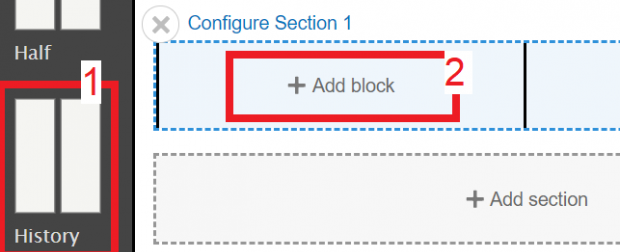
    Example on the Corporate website 
     

Choose your item's layout

There are 5 different layouts:

  • "Large top" layout
  • "
  • "Small right" layout


Please make sure that your image fits the selected layout.

See below how they look like. 

1960 - 1970

Small layout
1964

This is a SMALL LEFT layout.
To fit the card, your image must be in 1920*1510 px dimension. 

1965

This is a SMALL RIGHT layout.
To fit the card, your image must be in 1920*1510 px dimension. 

1980-1990

Large layout
1986

This is a LARGE LEFT layout.
To fit the card, your image must be in 1180*1920 px dimension. 

1987

This is a LARGE RIGHT layout.
To fit the card, your image must be in 1180*1920 px dimension. 

2000-2020

Top large layout
2005

This is a LARGE TOP layout. 
To fit the card, your image must be in 1920*780 px dimension.